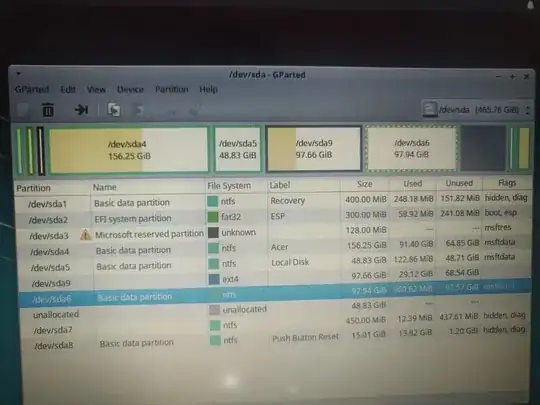
 How to allocate 48gb space you see in this picture to ext4 linux partition? so total i would have 148gb in total please help
Asked
Active
Viewed 286 times
-2

Pilot6
- 90,100
- 91
- 213
- 324

2 Answers
0
Make sure that you have a good backup of your important Ubuntu files, as this procedure can corrupt or loose data.
Keep these things in mind:
always start the entire procedure with issuing a
swapoffon any mounted swap partitions, and end the entire procedure with issuing aswaponon that same swap partitiona move is done by pointing the mouse pointer at the center of a partition and dragging it left/right with the hand cursor
a resize is done by dragging the left/right side of a partition to the left/right with the directional arrow cursor
if any partition can't be moved/resized graphically, you may have to manually enter the specific required numeric data (don't do this unless I instruct you to)
you begin any move/resize by right-clicking on the partition in the lower pane of the main window, and selecting the desired action from the popup menu, then finishing that action in the new move/resize window
Do the following...
Note: if the procedure doesn't work exactly as I outline, STOP immediately and DO NOT continue.
- boot to a Ubuntu Live DVD/USB
- start
gparted - move sda6 partition all the way to the right
- resize the right side of sda9 all the way to the right
- click the Apply icon
- reboot


- https://www.howtoforge.com/partitioning_with_gparted
- https://gparted.org/display-doc.php%3Fname%3Dmoving-space-between-partitions
– Iogui Jun 20 '19 at 18:13