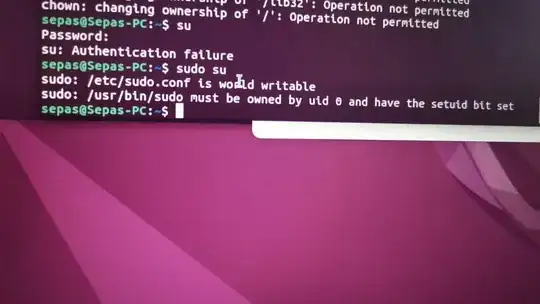
The fastest way to resolve this issue will be to re-install your OS. Changing the ownership of every file and directory is a non-recoverable error for someone who is not heavily invested in knowing how the operating system works.
– matigoMay 25 '22 at 05:30
Restoring data from your backups is likely easiest... You can also create a script that will restore the file metadata (ie. filestats) from your backups & restore only the file-permissions onto your actual file-system (a good learning exercise in my opinion) but it'll take far longer than a backup restore, or re-install (but the exercise tends to make you learn not to do it again; why new-hires are made to correct it this way), but it's up to you. You've not provided any OS/release details; but you can re-install a Ubuntu Desktop system easily without losing data (don't format!)
– guivercMay 25 '22 at 05:50
FYI: For certain files, eg. sudoers , at the first error the read of the file is terminated with the error being treated as the EOF marker (ie. end of file).. The effect is that if file-permissions are not as they should be, no actual data is read; so any data within your sudoers won't be read until it's file permissions are restored to valid values. That may require certain files to be fixed from live media
– guivercMay 25 '22 at 05:53


sudoers, at the first error the read of the file is terminated with the error being treated as the EOF marker (ie. end of file).. The effect is that if file-permissions are not as they should be, no actual data is read; so any data within yoursudoerswon't be read until it's file permissions are restored to valid values. That may require certain files to be fixed from live media – guiverc May 25 '22 at 05:53