3

I'm experiencing problems with quite some webpages while using Google Chrome (stable build: 23.0.1271.97). Many websites like facebook, youtube, arstechnica not rendering as they should, also this problem is happening only in Google Chrome, and not in Mozilla firefox.

Here are some screenshots: enter image description here

I tried disabling accelerated 2D canvas, CSS Animations and GPU Compositing on all pages. Even tried doing this:

google-chrome  --blacklist-accelerated-compositing

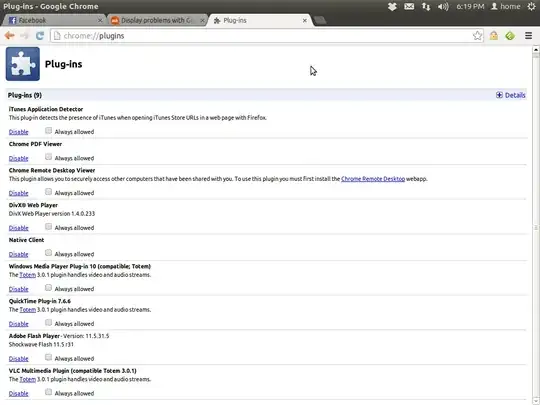
all suggested here, but it didn't help. List of all plugins installed - enter image description here Please help me in fixing this, any help would be appreciated.
  • The latest version I have on my machine is 23.0.1271.97. Try updating Chrome, then (without Chrome running), run 'mv ~/.config/google-chrome/Default ~/.config/google-chrome/Default.backup' and see if that might possibly fix things. I'm concerned that a plugin might be botching up your webpages. – somoso Dec 22 '12 at 11:44
  • I'd recommend the re-installation of Google Chrome, first, your Google Chrome is outdated, second, downloading GC again you're going to have the newest version installed on your Ubuntu, and might the bug was fixed in this new version. – Zignd Dec 22 '12 at 11:52
  • @Zignd & at.somoso - Will try those. But I'm pretty sure it's not a plugin. – alvasrawuther Dec 23 '12 at 12:39
  • Tried updating, now using latest stable version(Version 23.0.1271.97), still no change with that display issue.

    Here's a screenshot list of all the plugins I have installed, I don't think they are a problem though. http://i.imgur.com/EHuQU.png

    – alvasrawuther Dec 23 '12 at 12:50
  • Doing what @somoso suggested didn't help either, BTW. – alvasrawuther Dec 23 '12 at 12:58
  • The only thing I can really suggest at this point is checking your graphics driver through Additional Drivers and ensure that you are running drivers like nvidia current or just flat out deactivating them and seeing if that helps at all. If that remedies the situation, do an update on your system perhaps? – somoso Dec 25 '12 at 12:23
  • I'm having the same problem, and would like to add a detail. When using Facebook chat, anything I do takes effect (sending a message) but doesn't update to reflect that until I switch to another tab, then back again. – Jeff Dec 27 '12 at 06:47

2 Answers2

5

I did nothing of above, i just disabled hardware acceleration in chrome settings menu and my problems disappeared !

  • Thank you, thank you, thank you. The problem was driving me nuts. I'm not sure why I was expecting Kubuntu 20 to play nice with an Nvidia 1060 laptop? Your suggestion has improved my life no end. Cheers! – Andrew Jens Oct 22 '20 at 07:06
1

@alvaswuther, I see you solved your problem on another website but didn't bother posting back here with the answer:

Uninstalled AMD's additional display drivers and re-installed Chrome. Then disabled and enabled all plugins - no issues. Everything seems to be working right now, thanks a lot everyone.

gertvdijk
  • 67,947
  • Oops, extremely sorry for that. I usually try to post the solution on every website that I asked the question. Sorry, I'll take care of that from next time. – alvasrawuther Jan 10 '13 at 11:24