Sometimes when I run a command I don't notice that I needed to run it as super user to have enough permission.
Is there a way to run the same command again but as a super user?
Sometimes when I run a command I don't notice that I needed to run it as super user to have enough permission.
Is there a way to run the same command again but as a super user?
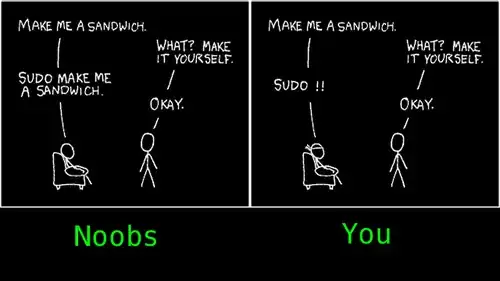
Answer: you enter sudo !! straight afterwards to repeat the previous command with escalated privileges.
edit: Image found via reddit, and it's a parody of the original xkcd comic by Randall Munroe.

You could try the up-arrow key to scroll through your old commands and rewrite/change them and add the sudo in front of them. (the home button above the arrow keys will set the position to the beginning.)
I dislike the sudo !! idea, because sometimes you add another command in between and don't remember anymore.

sudo !!, the shell will expand !! so that you can see what command it's trying to run. So, it may end up being irritating to hit Ctrl-C and find the right command, but it at least won't take you unawares.
– Reid
May 27 '13 at 21:58
!!
– Izkata
May 28 '13 at 01:33
sudo !!<TAB> and it autocompletes !! for me. Bash can expand history with M-^ (for me, alt+shift+6), but that's less fluent (you could rebind this, though). There is also shopt -s histverify, which makes it so that when you use history expansion and hit enter, it instead gives you another prompt line with the expansion performed to let you see/edit it.
– Reid
May 28 '13 at 01:46
shopt -s histverify won't help a single bit. Most people will get used to hitting Enter twice. At that point they're still too late to check what happened.
– Frank Kusters
May 30 '13 at 09:29
control-alt-e before hitting enter to edit the bang bang !!
– alchemy
May 10 '22 at 02:04
This question could have been generalized into "Run same command but with some modification", since one of the brilliant design decisions in Unix, is that what's implemented once in the shell, can be leveraged by any command being invoked from the shell.
In other words, this trick doesn't apply just to sudo:
sudo !!)time !!)env A=b B=z !!)!!)History expansion (also known as history substitution) is just a shell feature to make repeating previous commands easier (with less keystrokes). Check your shell man page for history expansion. It describes many more tricks and short-cuts you can do with history for example:
You may refer to previous commands by number:
!55                 # repeat command number 55
!-1                 # repeat the previous command, alias for !!
!-2                 # repeat the command before the previous command
You may refer to individual words in previous commands:
some-command !$ # run some-command on the last arg of previous command
You can also search before repeating:
!?awk # repeat the last command including the string 'awk'
You can search the history and replace something by something else:
!?awk?:s/str1/str2/ # repeat previous command matching 'awk' replacing str1 by str2
And much more, since you can combine command selection, arg-selection, search and replace independently.
The man page of your shell (in this case man bash) is your friend.

I'll just add an alternative: as short as typing sudo !! and more flexible:
Up-arrow (once, or until you find the command you want to sudo/edit, if it's older)
ctrl+A   (place cursor at beginning of line)
"sudo "
Enter
It's exactly the same number of keystrokes (I count "ctrl+A" as one...), but adding "up arrow" you can do it on whichever command is in your history.

set -o vi). Then you can Escape (go to command mode), and then 'I' (capital 'i', insert at beginning of line).
– Gerhard Burger
May 30 '13 at 10:31
There are a few ways to do this
Simply enter the command again adding sudo before the command
Press Up arrow to get the last command and put sudo in front of it.
Enter sudo !!
The !! expands to the last entered command. You can do similar things with other things with the command line history see here


I use zsh instead of bash and have this in my ~/.zshrc, so pressing Alt+S inserts sudo at the beginning of the command line:
insert_sudo () { zle beginning-of-line; zle -U "sudo " }
zle -N insert-sudo insert_sudo
bindkey "^[s" insert-sudo
Unfortunately, I couldn't track down a way to do the same thing in bash.

~/.inputrc "\es":"\C-asudo " and you will move to the start of a long line and sudo will be inserted at the start of the line upon pressing alt-s. Restart terminal or re-read ~/.inputrc for it to work.
–
May 28 '13 at 17:25
If you want to do it in an alias, you have to use alias redo='sudo $(history -p !!)' for some reason.

The way I prefer it:
But it might be easier to just do "sudo !!", it's up to you.

su -c "!!"
If you do not have permission to be root with sudo or sudo program did not install on system.


!!on its own runs your previous command as per saved inhistory. In addition, doing!-1,!-2, and so on executes your last command, second last command, and so on. Handy! – oaskamay May 27 '13 at 20:41!<command>will execute last event from~/.bash_historythat start with<command>– Radu Rădeanu May 27 '13 at 20:54!bash thing copied fromtcshhas screwed me up more times than it's ever been useful. Double quotes don't protect from the interpretation of!.$ foo "!bar"->!bar: event not found. – Kaz May 28 '13 at 07:26set -H- add that to your .bashrc to turn it off permanently. – evilsoup May 28 '13 at 10:58set +Hto disable it. – evilsoup May 28 '13 at 21:02